 CookSync
CookSync — Functional Specification
What the system does, who uses it, and the rules it enforces. This document describes the functional behaviour of the system as implemented; the technical design behind it lives in the module READMEs (client, server, shared DTOs).
1. Purpose and scope
CookSync is a recipe-sharing platform: a mobile client where people discover recipes written by others, cook them with guided assistance, and publish their own, backed by a REST API that owns all persistent data and all authorization decisions.
In scope: account lifecycle, recipe authoring and discovery, guided cooking, personal annotation, community rating and reporting, and content moderation.
Out of scope: payments, shopping-list/grocery integration, meal planning, nutritional analysis, and social graph features (following users, feeds of friends’ activity).
Delivery: a native Android application. There is no browser client — the public web presence is a static project page carrying the privacy policy, the terms of use and the app download.
2. Actors
| Actor | Description | How they authenticate |
|---|---|---|
| Guest | Someone who has not signed in. Can only register, sign in, or start password recovery. | — |
| Registered user | The primary actor. Browses, searches, cooks, favorites, annotates, reviews, and authors recipes. | Email + password, then a bearer access token |
| Administrator | A registered user with the admin flag. Everything a registered user can do, plus the moderation console. | Same, with an admin claim enforced server-side |
| System | Scheduled background jobs that run without a user present. | — |
A user’s admin status is a property of their account, set in the data layer rather than through any in-app flow.
3. System overview
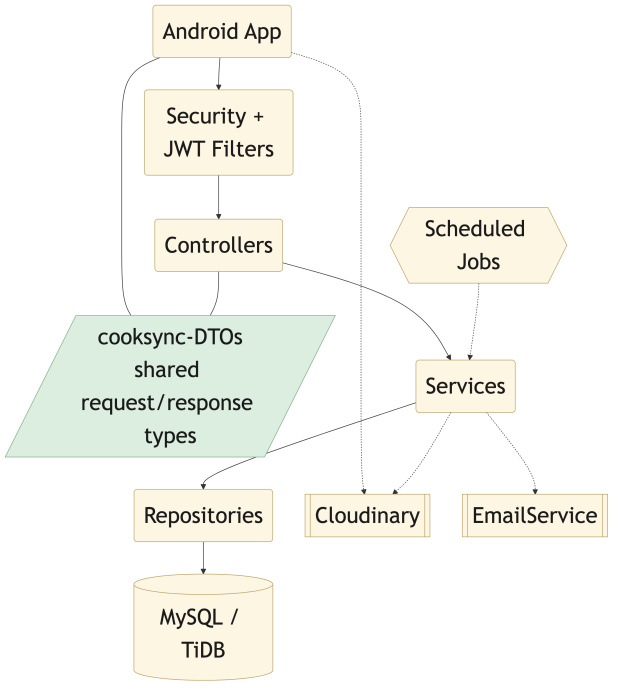 How a request travels: the Android app through the security filters and controllers, into the services, and out to the database and the external providers.
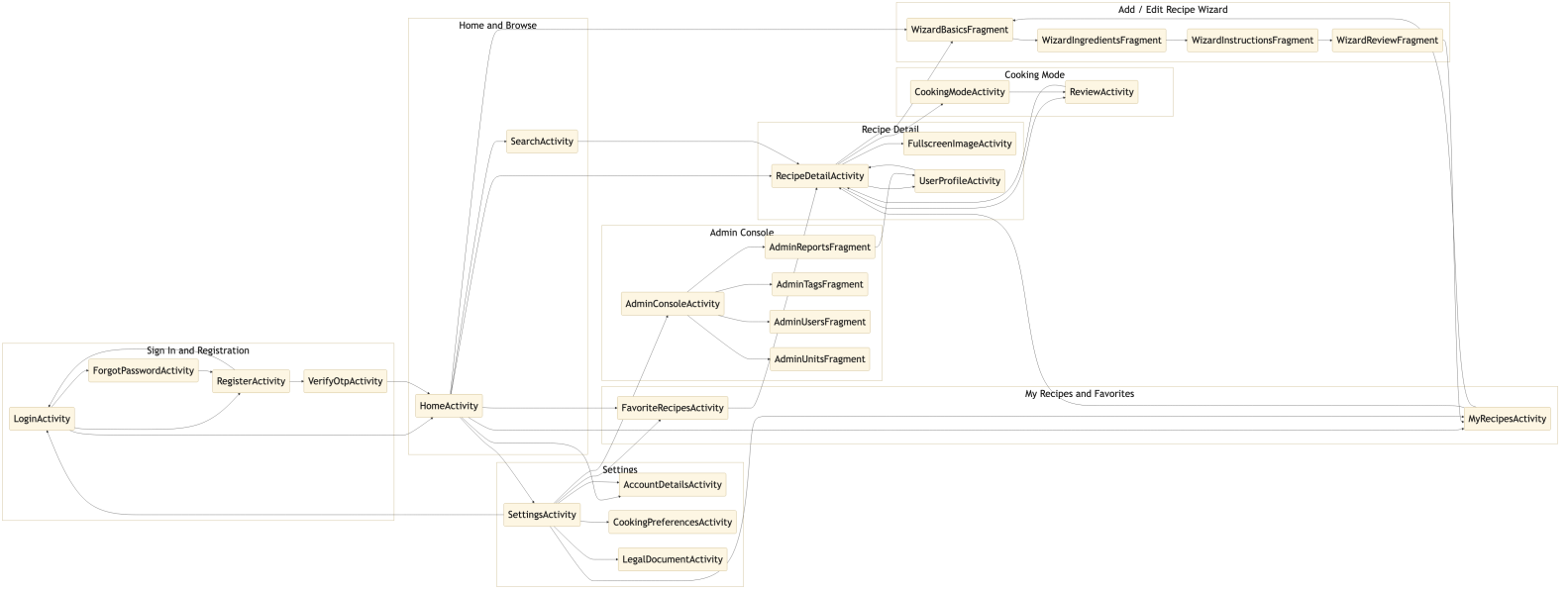 Every screen in the app and how they connect — open full size.
Three deployable/consumable units:
| Unit | Responsibility |
|---|---|
cook-sync-client |
Android application — all user interaction, local drafts, local session storage, direct-to-cloud image upload |
cook-sync-server |
REST API — persistence, authentication, authorization, business rules, email, scheduled jobs |
cooksync-DTOs |
The request/response contract, compiled once and consumed by both sides so the two cannot drift apart |
The client holds no authoritative state. Everything it shows comes from the API, with two deliberate exceptions: the encrypted session (tokens) and in-progress recipe drafts, both of which are device-local by design.
4. Functional areas
4.1 Account lifecycle
Registration is two-phase. Submitting the form creates a pending registration and emails a one-time code; the account only comes into existence when that code is verified. Unverified pending registrations expire and are deleted by a scheduled job.
Sign-in issues an access token plus a refresh token. The client stores both encrypted on the device and refreshes transparently when the access token expires, so the user is not interrupted mid-task. Each refresh rotates the refresh token.
Password recovery is a separate emailed-token flow that does not require being signed in.
Profile management covers display name, avatar, email address and password. Changing an email address or a password — and deleting the account — requires the caller to re-enter their current password.
Privacy settings let a user decide, per visibility toggle, whether their published recipes and their favorites appear on their public profile.
Account deletion is reversible for 30 days: content is hidden immediately, the account is purged permanently by a scheduled job once the grace period elapses, and signing back in during that window cancels the deletion.
4.2 Recipe discovery
Users browse a paged feed of published recipes and search by free text across recipe names and ingredients, narrowing results by tag, difficulty and preparation time. Popular tags are surfaced as shortcuts. All filtering is resolved server-side as a dynamic query, so paging stays consistent as filters change.
4.3 Recipe authoring
A recipe is authored through a four-step wizard — basics, ingredients, instructions, final review — and consists of a title, description blocks, images, difficulty, preparation time, servings, tags, an ordered ingredient list (quantity + unit + name) and an ordered instruction list.
Two behaviours matter functionally:
- Drafts survive navigation. An unfinished recipe is persisted locally and restored on return. Drafts are device-local and are not synchronized.
- Publishing is detached from the UI. Confirming a recipe hands the work (image upload → creation of any new tags → save) to a background process that is not tied to any screen’s lifecycle, so leaving the screen does not cancel publishing.
An author may edit a recipe, toggle its visibility to withdraw it from the public feed without destroying it, or delete it outright.
Users may introduce a tag that does not yet exist; it becomes available platform-wide, with duplicate cleanup handled through moderation (§4.7).
4.4 Guided cooking
Cooking Mode presents one instruction at a time with a per-step countdown timer that can be started, paused, extended by a minute, or set to an arbitrary duration. The user’s own step notes are shown next to the instruction. Two user preferences govern the experience: keeping the screen awake, and playing a sound on timer completion.
4.5 Personal annotation
A user may attach private notes to a recipe as a whole or to an individual preparation step. Notes are visible only to their author — never to the recipe’s author or to other users — and step notes are surfaced during guided cooking.
4.6 Community feedback
Users rate recipes with stars and write reviews. A user may delete their own review. Any user may report a review as inappropriate, which places it in the moderation queue rather than removing it immediately.
4.7 Moderation
Administrators work from a console covering:
- Users — listing, suspension, re-enablement and deletion of accounts.
- Reported reviews — the queue produced by §4.6.
- Tags — detection of near-duplicate tags (e.g. hyphenated vs. spaced variants) and merging them into a single canonical tag.
- Units — maintenance of the measurement-unit catalog offered in the wizard.
- Announcements — broadcasting a system message to users, and setting the minimum supported client version and download link that back §4.10.
Platform statistics are shown alongside.
4.8 Notifications
The system delivers push notifications to registered devices. Users control which categories they receive through notification preferences.
4.9 Content translation
Recipe content carries a source locale and can be automatically translated between Hebrew and English, so a recipe written in one language is readable in the other.
4.10 Client version gating
The API publishes a minimum supported client version for the platform, together with a download link. A client older than that minimum is stopped at a full-screen update prompt and cannot continue into the app. This check is deliberately reachable without authentication — a build too old to be trusted with the sign-in flow still has to be able to learn that it must update. Administrators set the minimum version and the download link from the console.
5. Domain model
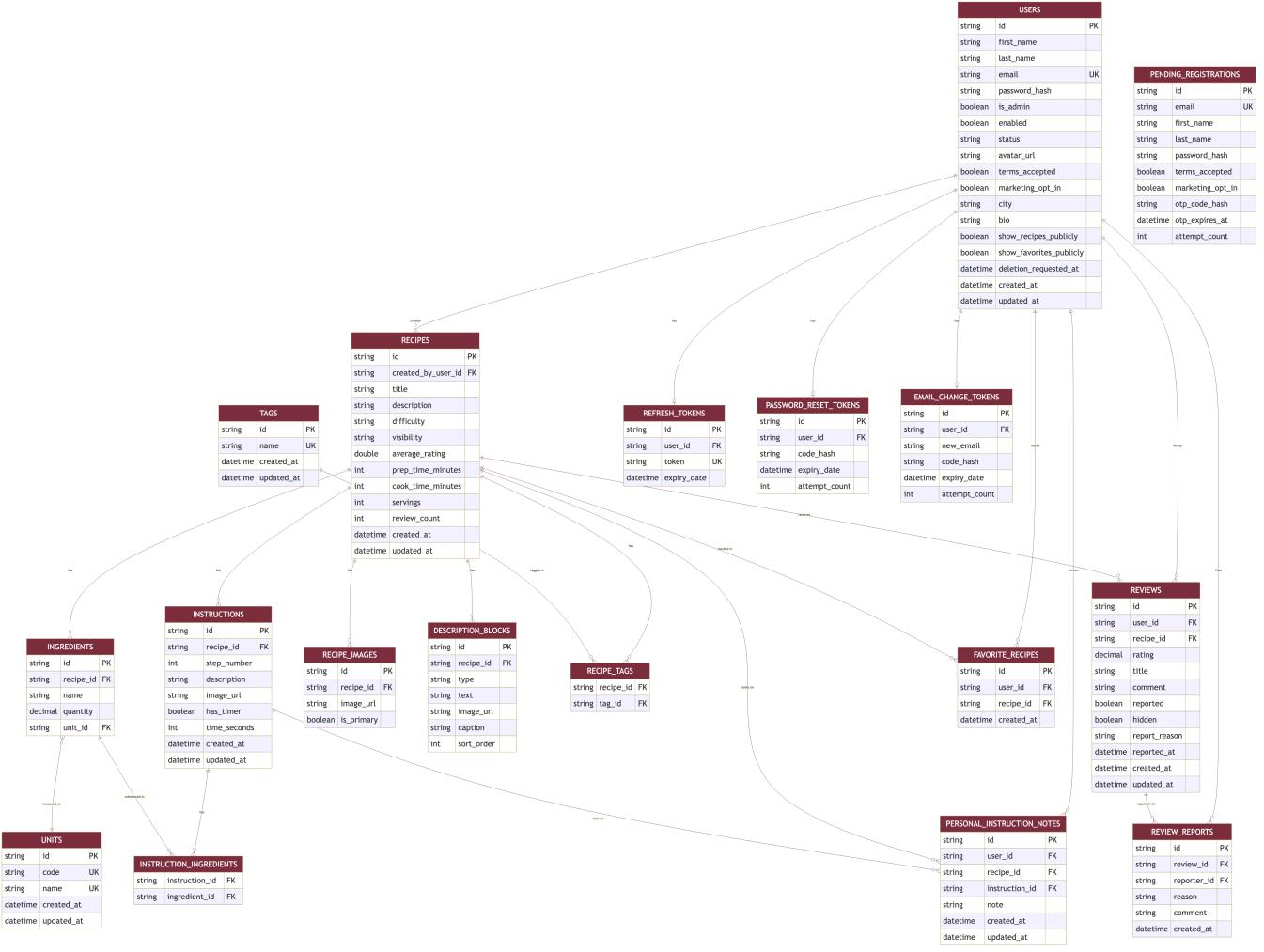 The full schema — open full size. Every table below appears here with its columns and relationships.
| Entity | Meaning | Key relationships |
|---|---|---|
| User | An account. Carries the admin flag, privacy toggles and deletion state. | Authors recipes and reviews; owns favorites and notes |
| Recipe | A published or hidden recipe. | Belongs to a user; has ingredients, instructions, description blocks, images, tags, reviews |
| Ingredient | One line of the ingredient list. | Belongs to a recipe; references a unit |
| Instruction | One ordered preparation step. | Belongs to a recipe; may carry per-user notes |
| DescriptionBlock | A block of the author’s free-text description. | Belongs to a recipe |
| RecipeImage | A hosted image reference. | Belongs to a recipe |
| Tag | A discovery label (cuisine, meal type, dietary preference…). | Many-to-many with recipes |
| Unit | A measurement unit, with singular and plural forms. | Referenced by ingredients |
| Review | A star rating plus written text. | Belongs to a user and a recipe |
| ReviewReport | A user’s report of a review. | Belongs to a user and a review |
| FavoriteRecipe | A user’s saved recipe. | Joins user ↔ recipe |
| PersonalInstructionNote | A private note on a recipe or a step. | Belongs to a user; targets a recipe or instruction |
| RefreshToken, PasswordResetToken, EmailChangeToken, PendingRegistration | Short-lived credentials backing the account flows in §4.1. | Belong to a user (or a pending one) |
6. Business rules
Ownership. A user may modify or delete only their own recipes, ingredients, instructions, reviews and notes. Administrators may act on any resource. Ownership is checked server-side on every mutation, never assumed from the client.
Authorization. Every endpoint except registration, sign-in, token refresh, password recovery, OTP verification, the client-version lookup (§4.10) and the health check requires a valid access token. Admin endpoints additionally require the admin claim.
Verification before existence. An account does not exist until its OTP is verified; an unverified registration expires.
Re-authentication for sensitive changes. Password change, email change and account deletion all require the current password.
Visibility. A hidden recipe is excluded from public listings and search but remains intact and editable for its author. A public profile exposes recipes and favorites only to the extent that user’s privacy settings allow.
Reversible deletion. Account deletion has a 30-day grace period; signing in during it cancels the deletion.
Referential safety. A unit or tag still in use cannot be removed outright — tags are merged into a canonical tag rather than deleted from under the recipes that use them.
Uniform errors. Every failure, whether a domain rule or a framework error, is returned in one consistent JSON envelope carrying an HTTP status, a stable error code and a human-readable message, so the client renders all errors the same way.
Rate limiting. Public authentication endpoints are throttled per IP to frustrate credential brute-forcing and email flooding, and a global per-IP limit applies across the API.
7. Non-functional behaviour
| Concern | Behaviour |
|---|---|
| Statelessness | No server-side session. Authorization is derived from the bearer token on each request, so the API scales horizontally |
| Schema management | All schema changes go through versioned, reviewed migrations applied automatically at startup |
| Media handling | Image bytes never pass through the API. The client uploads directly to the image host using a server-issued signature, and only the resulting URL is stored |
| Resilience in the UI | Every API call resolves into one of three states — loading, success, error — so every screen handles outcomes uniformly |
| Optimistic actions | Favoriting, visibility toggles and admin actions apply in the UI immediately and dispatch after a short delay, giving the user a window to undo |
| Scheduled maintenance | Daily jobs purge accounts past their grace period and clean up expired unverified registrations |
| Platform reach | Android 7.0 (API 24) and newer |
| Observability | A health endpoint reports service and database status without exposing internal detail to anonymous callers |
8. External services
| Service | Used for | If unavailable |
|---|---|---|
| Cloudinary | Hosting recipe and avatar images; signed direct-from-client upload | Image upload fails; existing images are unaffected |
| Gmail API | Sending OTP, registration and password-reset email over HTTPS | Codes are logged rather than emailed, so local development still works |
| Firebase Cloud Messaging | Push notifications and announcement broadcasts | Push delivery is disabled; the rest of the app is unaffected |
| MyMemory Translation API | Automatic Hebrew ↔ English content translation | Content is shown in its original language |
9. API surface
All routes are prefixed /api. The authoritative, per-endpoint table lives in
cook-sync-server/README.md;
the functional grouping is:
| Area | Base path | Covers |
|---|---|---|
| Authentication & account | /api/auth |
Registration, OTP, sign-in, refresh, sign-out, password recovery, profile, avatar, email/password change, privacy, deactivation and deletion |
| Recipes | /api/recipes |
Listing, search, browse by tag, own recipes, create, update, delete, visibility |
| Recipe content | /api |
Ingredients and instructions of a recipe |
| Reviews | /api |
List, create, delete, report |
| Notes | /api/notes |
Private notes on a recipe or a step |
| Favorites | /api/favorites |
List, add, remove |
| Tags | /api/tags |
List, popular, create |
| Units | /api/units |
List (any user); create and delete (admin) |
| Users | /api/users |
Public profile, recipes and favorites, gated by privacy settings |
| Media | /api/cloudinary |
Upload signature for direct-to-cloud upload |
| Devices | /api/devices |
Registering and unregistering a device’s push token |
| Notification preferences | /api/notification-preferences |
Reading and updating per-category push preferences |
| Announcements | /api/announcements |
Fetching the active system announcement and dismissing it |
| App configuration | /api/app-config |
Minimum supported client version and download link — the one endpoint besides sign-in and health that is reachable without a token, so an out-of-date client can learn it must update |
| Administration | /api/admin |
Statistics, users, reported reviews, duplicate-tag detection and merge |
Day-to-day usage of these features is described in the user guide.